Float entry payment setup
We will describe here how to configure a float entry payment type. The screenshots are taken from the float entry payment configurations on demo data.
First we need to have a payment type with Default function "Float tender". We can create it by going to General setup > Payments > Payment types > click on add button.
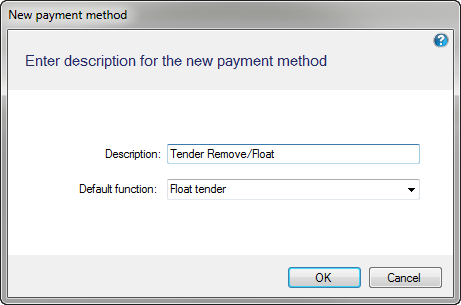
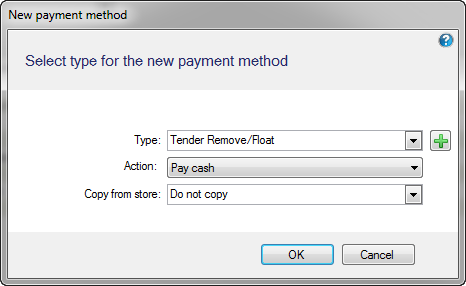
We then add the float tender payment type we added above to a store by going to Store setup > Stores > Stores > edit a store > Allowed payment types tab > click on add button.
In Action, choose which tender will be used when performing the Float tender operation.
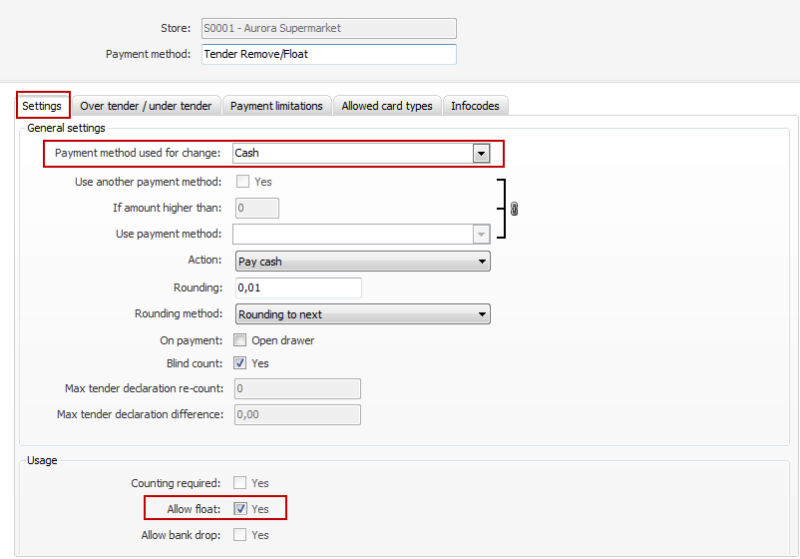
Click on OK and the Payment type view will be displayed. On the Settings tab we need to set the Payment method used for change. This will tell the Float entry operation in the POS which tender should be added to the drawer and then be included in the tender declaration calculations, X and Z report and other EOD operations. Usually this is set as the Cash payment type. But if your customer needs a separate float entry operation to add vouchers that have to be counted by the casher the Payment method of change should be selected as the voucher payment type. If float entry is needed for currencies then a payment method per currency could be created and a separate float operation per currency added to buttons on the POS and etc.
The Allow float field needs to be checked.
| Last updated: | 19th February 2015 |
| Version: | LS One 2014 |

